


- Katılım
- 18 Temmuz 2025
- Mesajlar
- 110
- Tepkime puanı
- 2
- Konu Yazar
- #1
Selamlar Arkadaşlar,
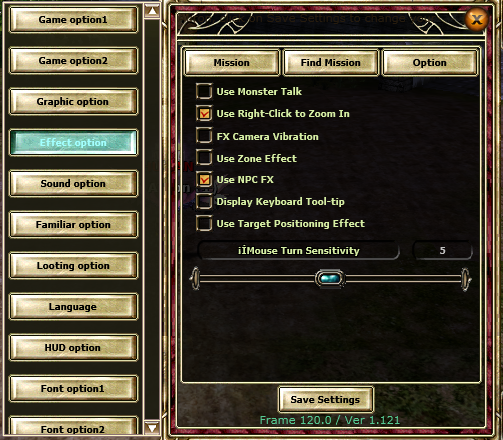
Oyun içinde F10 tuşuna basarak açabileceğiniz Options penceresinde sizleri birçok yenilik ve özellik beklemektedir.
Bu seçenekler sayesinde client performansınızı en üst seviyeye çıkarabilir veya ihtiyaçlarınıza göre performansı düşürebilirsiniz.
Options Penceresinde Bulunan Başlıca Özellikler:
Object dosyası atmadan objeleri kaldırabilirsiniz.
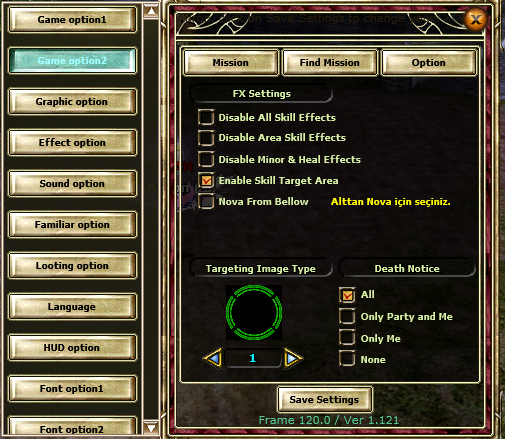
Alan skillerinizi maksimum mesafeye sabitleyebilirsiniz.
Mage Nova skilleri için alttan Nova FX’i özelleştirebilirsiniz.
Oyun içindeki tüm FX’leri kapatabilirsiniz.

Hello Everyone,
You can access the Options menu by pressing the F10 key in-game.
This panel offers many new features that allow you to either boost your client performance to the maximum or reduce it based on your system needs.
Key Features Available in the Options Menu:
Remove in-game objects without needing to replace object files.
Fix AOE skill range to max distance.
Customize Nova FX for mage skills.
Disable all visual FX effects in-game.
Advanced settings panel to optimize graphic performance based on system needs.
Oyun içinde F10 tuşuna basarak açabileceğiniz Options penceresinde sizleri birçok yenilik ve özellik beklemektedir.
Bu seçenekler sayesinde client performansınızı en üst seviyeye çıkarabilir veya ihtiyaçlarınıza göre performansı düşürebilirsiniz.
Options Penceresinde Bulunan Başlıca Özellikler:
Object dosyası atmadan objeleri kaldırabilirsiniz.
Alan skillerinizi maksimum mesafeye sabitleyebilirsiniz.
Mage Nova skilleri için alttan Nova FX’i özelleştirebilirsiniz.
Oyun içindeki tüm FX’leri kapatabilirsiniz.
Hello Everyone,
You can access the Options menu by pressing the F10 key in-game.
This panel offers many new features that allow you to either boost your client performance to the maximum or reduce it based on your system needs.
Key Features Available in the Options Menu:
Remove in-game objects without needing to replace object files.
Fix AOE skill range to max distance.
Customize Nova FX for mage skills.
Disable all visual FX effects in-game.
Advanced settings panel to optimize graphic performance based on system needs.