

- Katılım
- 18 Temmuz 2025
- Mesajlar
- 116
- Tepkime puanı
- 2
- Konu Yazar
- #1
Selamlar Arkadaşlar
Slave Merchant Nedir?
Slave Merchant, oyun içerisinde sizin kopya karakterinizi oluşturup " Merchant " açan bir sistemdir.
Slave Merchant Nasıl Kurulur?

Slave Merchant kurmak için öncelikle " Slave Merchant " eşyasına sahip olmanız gerekmektedir.
Slave Merchant eşyasını Power-UP Store'dan " 100 Knight Cash " karşılığında temin edebilirsiniz.
Bu eşyayı " Skill Barınıza " koyup basabilirsiniz. Her bastığınız Scroll 60 dakika süre vermektedir.
Merchant kurarken " Slave Merchant " tikini işaretlemeniz gerekmektedir.
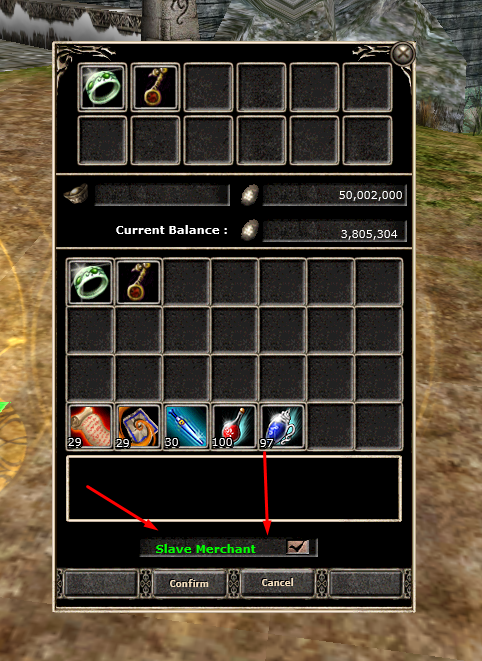
Merchant'ı kurduktan sonra kopya karakteriniz aşağıdaki gibi Merchant kurduğunuz bölgede oluşacaktır.
Slave Merchant'ta Satılan Eşyalarımı Nereden Görebilirim?
Oyun içerisinde Sol üst tarafta bulunan " Yeşil Adam " butonuna tıklayarak satılan veya satılmayan eşyalarını görebilirsiniz.
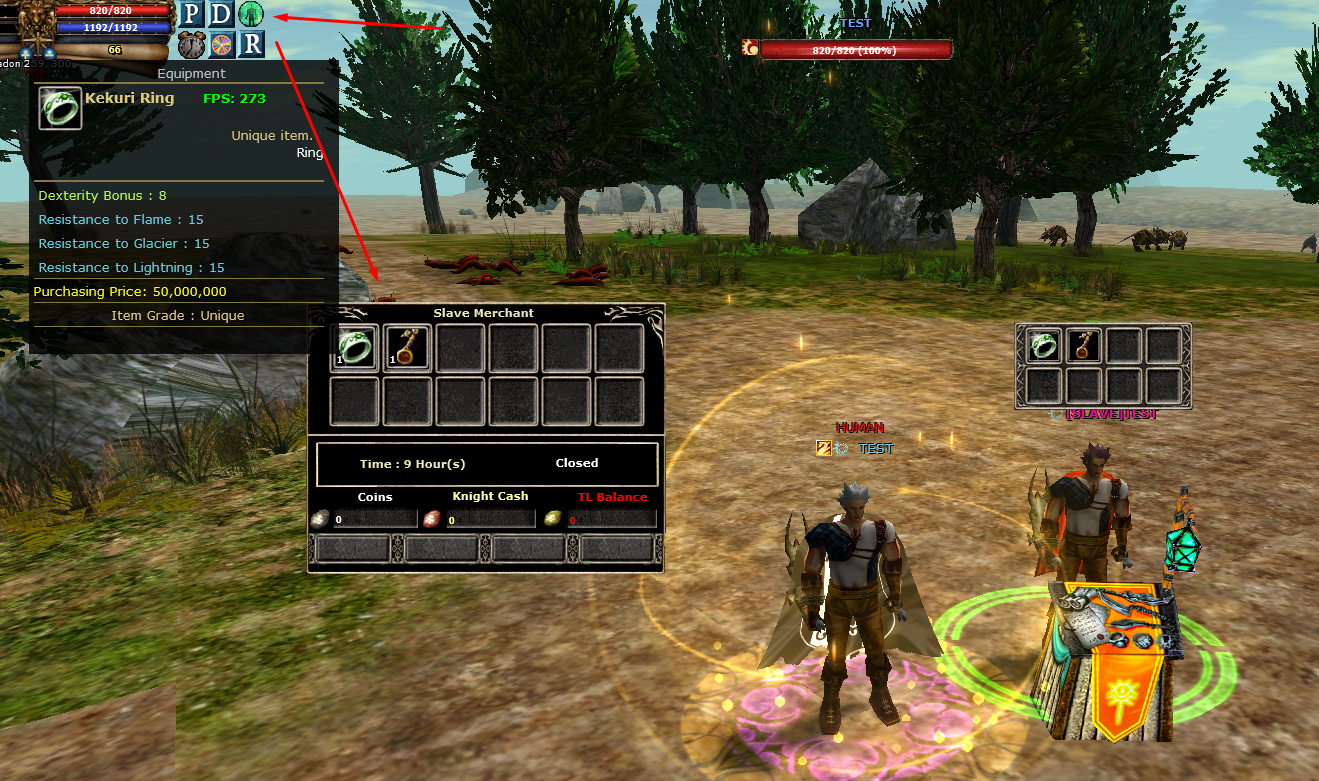
Orta tarafta bulunan " Time Hour(s) " Slave Merchantın kalan süresidir.
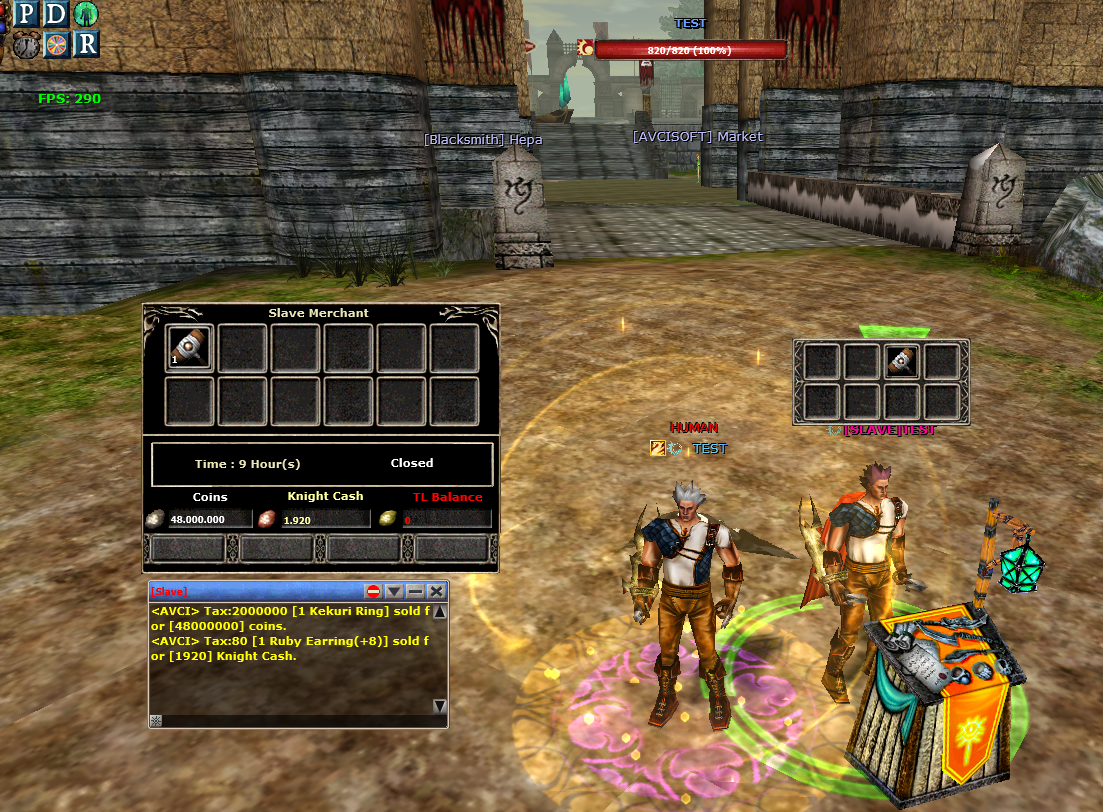
[Slave] Pm : Her satışlarınız anlık tarafınıza bilgi olarak aktarılacaktır %4 pazar vergisi aktif olduğu için vergiden sonraki tutar yansır.
Close Merchant: Slave Merchantınızı tamamen kapatır ve satış yaptığınız coins,kc veya bakiye hesabınıza aktarır.
Not : Cz'de Slave Merchant'a closed yaptığınızda para bankaya gider üzerinize gelmez cz'de ölünce coin gitmemesi için.
────────────────────────────────────────────────────────
Hello Everyone
What is the Slave Merchant?
Slave Merchant is a system that creates a clone of your character in the game and opens a "Merchant".
How to Set Up a Slave Merchant?
To set up a Slave Merchant, you first need to have the "Slave Merchant" item.
You can obtain the Slave Merchant item from the Power-UP Store for "100 Knight Cash".
You can place this item on your "Skill Bar" and use it. Each Scroll you use provides 60 minutes of duration.
When setting up a Merchant, you must check the "Slave Merchant" box.
After setting up the Merchant, your clone character will appear in the area where you set it up, as shown below.
Where Can I See My Items Sold in the Slave Merchant?
You can see your sold or unsold items by clicking the "Green Man" button located in the top left corner of the game screen.
The "Time Hour(s)" in the middle shows the remaining time of your Slave Merchant.
[Slave] Pm : Every sale will be instantly sent to you as an information message. Since a 4% market tax is active, the amount after tax will be reflected.
Close Merchant: Completely closes your Slave Merchant and transfers the coins, kc, or balance from your sales to your account.
Note: When you "close" a Slave Merchant in CZ, the money goes to the bank instead of your inventory, so you don't lose your coins if you die in CZ.
Slave Merchant Nedir?
Slave Merchant, oyun içerisinde sizin kopya karakterinizi oluşturup " Merchant " açan bir sistemdir.
Slave Merchant Nasıl Kurulur?
Slave Merchant kurmak için öncelikle " Slave Merchant " eşyasına sahip olmanız gerekmektedir.
Slave Merchant eşyasını Power-UP Store'dan " 100 Knight Cash " karşılığında temin edebilirsiniz.
Bu eşyayı " Skill Barınıza " koyup basabilirsiniz. Her bastığınız Scroll 60 dakika süre vermektedir.
Merchant kurarken " Slave Merchant " tikini işaretlemeniz gerekmektedir.
Merchant'ı kurduktan sonra kopya karakteriniz aşağıdaki gibi Merchant kurduğunuz bölgede oluşacaktır.
Slave Merchant'ta Satılan Eşyalarımı Nereden Görebilirim?
Oyun içerisinde Sol üst tarafta bulunan " Yeşil Adam " butonuna tıklayarak satılan veya satılmayan eşyalarını görebilirsiniz.
Orta tarafta bulunan " Time Hour(s) " Slave Merchantın kalan süresidir.
[Slave] Pm : Her satışlarınız anlık tarafınıza bilgi olarak aktarılacaktır %4 pazar vergisi aktif olduğu için vergiden sonraki tutar yansır.
Close Merchant: Slave Merchantınızı tamamen kapatır ve satış yaptığınız coins,kc veya bakiye hesabınıza aktarır.
Not : Cz'de Slave Merchant'a closed yaptığınızda para bankaya gider üzerinize gelmez cz'de ölünce coin gitmemesi için.
────────────────────────────────────────────────────────
Hello Everyone
What is the Slave Merchant?
Slave Merchant is a system that creates a clone of your character in the game and opens a "Merchant".
How to Set Up a Slave Merchant?
To set up a Slave Merchant, you first need to have the "Slave Merchant" item.
You can obtain the Slave Merchant item from the Power-UP Store for "100 Knight Cash".
You can place this item on your "Skill Bar" and use it. Each Scroll you use provides 60 minutes of duration.
When setting up a Merchant, you must check the "Slave Merchant" box.
After setting up the Merchant, your clone character will appear in the area where you set it up, as shown below.
Where Can I See My Items Sold in the Slave Merchant?
You can see your sold or unsold items by clicking the "Green Man" button located in the top left corner of the game screen.
The "Time Hour(s)" in the middle shows the remaining time of your Slave Merchant.
[Slave] Pm : Every sale will be instantly sent to you as an information message. Since a 4% market tax is active, the amount after tax will be reflected.
Close Merchant: Completely closes your Slave Merchant and transfers the coins, kc, or balance from your sales to your account.
Note: When you "close" a Slave Merchant in CZ, the money goes to the bank instead of your inventory, so you don't lose your coins if you die in CZ.